
Introduction
docuRob®eForms software tools are an important element of application solutions implemented on the docuRob ® platform . Forms are used to create formatted electronic documents presented in a web browser intended for users of the document repository and for business processes operating in its environment. By storing the content of forms in XML file format, data exchange is possible between IT systems.
Because an API (application programming interface) for Java has been made available, docuRob® eForms forms can also be used as part of any software tool environment. Figure 1. Presents the integration architecture of the docuRob®eForms product.
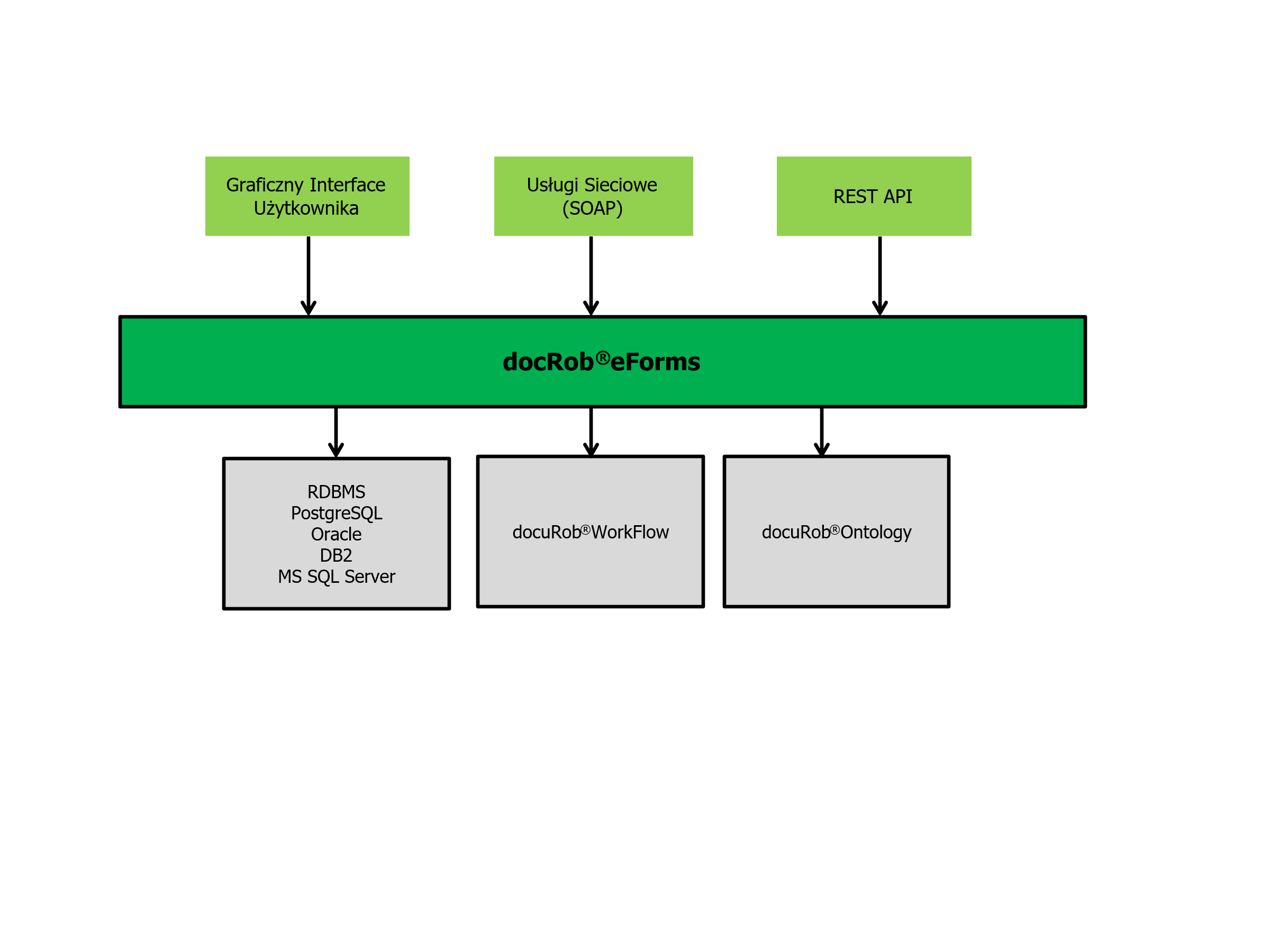
Figure 1. Electronic form in the docuRob ® platform architecture
Electronic forms constitute the user's graphical interface (GUI) in manual activities of docuRob® WorkFlow processes and are used, among other things, to enter or modify data used to control the execution of the business process. The form is presented in a web browser together with the appropriate configuration of function buttons, defined within the business process model, that launch the required application functions.
In the case of using a form as an interface for transferring data between IT systems, both for starting a business process and as part of its automatic activities, it is possible thanks to the automatically generated definition of the structure of its XML file in WSDL (Web Service Description Language).
The Java API enables form processing by external software of IT systems, supporting such operations as downloading a form file in XML format, downloading and filling in form field values, and saving form data to relational database tables. The API publishes a number of functions for managing form instances, such as versioning, and allowing the use of form ontology resources, available as dictionaries, form type definitions, or a central data dictionary containing definitions of all data used in the forms of a given organizational unit using the docuRob ® platform .
Forms docuRob®eForms are used as a graphical user interface of web applications implemented on the docuRob ® platform available on workstations, laptops, and mobile devices.
Forms available in knowledge management systems implemented based on docuRob®WorkFlow and docuRob®Ontology products are primarily used to define and enter metadata of information objects stored in the knowledge resources repository. A properly designed metadata model of information object classes allows for the automatic creation and maintenance of Knowledge Maps constituting a network of relationships between information objects used as a navigational search interface available in the docuRob®Ontology module .
docuRob®eForms ensure data security through the use of data encryption mechanisms and the possibility of using a secure electronic signature. Additionally, forms stored as electronic documents in the docuRob ® platform repository are protected by an extensive access permissions subsystem based on ontological resources and rules supported by docuRob ® Ontology .
Ease of creating and publishing forms
docuRob®eForms utility software enables easy creation of large-volume electronic forms with complex structures. A key stage in the process of building forms is the creation of hierarchical data classification (taxonomy), the elements of which can be linked to form fields. Based on the prepared taxonomy, application solution designers can use the form editor to create electronic sheets and define the links between individual items and taxonomy elements. Thanks to the wizards available in the system, it is also possible to automatically generate forms with a strictly defined structure.
For each form cell or group of cells, you can define a set of attributes that affect their appearance and use (e.g. financial data attributes: numeric, currency, binary). These attributes can be freely modified, and thanks to their use, the system ensures correct completion of forms by forcing only correct values to be entered in the appropriate fields. Ready forms are automatically published on the forms publication website.
Forms as User Interface
Forms are displayed as part of the docuRob® WorkFlow task. The user can fill in the fields that are required within the supported use case. Thanks to attributes related to the form fields and tips included in the forms on how to fill them out, the system ensures that only correct values are entered in the appropriate fields. The docuRob®eForms software also allows for updating dictionary values, saving and reading the form to a file, and printing it. The script created by the form creator allows for automatic verification of the correctness of the data entered into the form fields and for exporting data to a file in XML format.
The extensive attributes of the form field definitions allow for a wide variety of their graphic designs. An example of the variety of graphic styles is the gallery of selected forms used in business processes implemented in docuRob® applications , which is presented in Figure 2 .
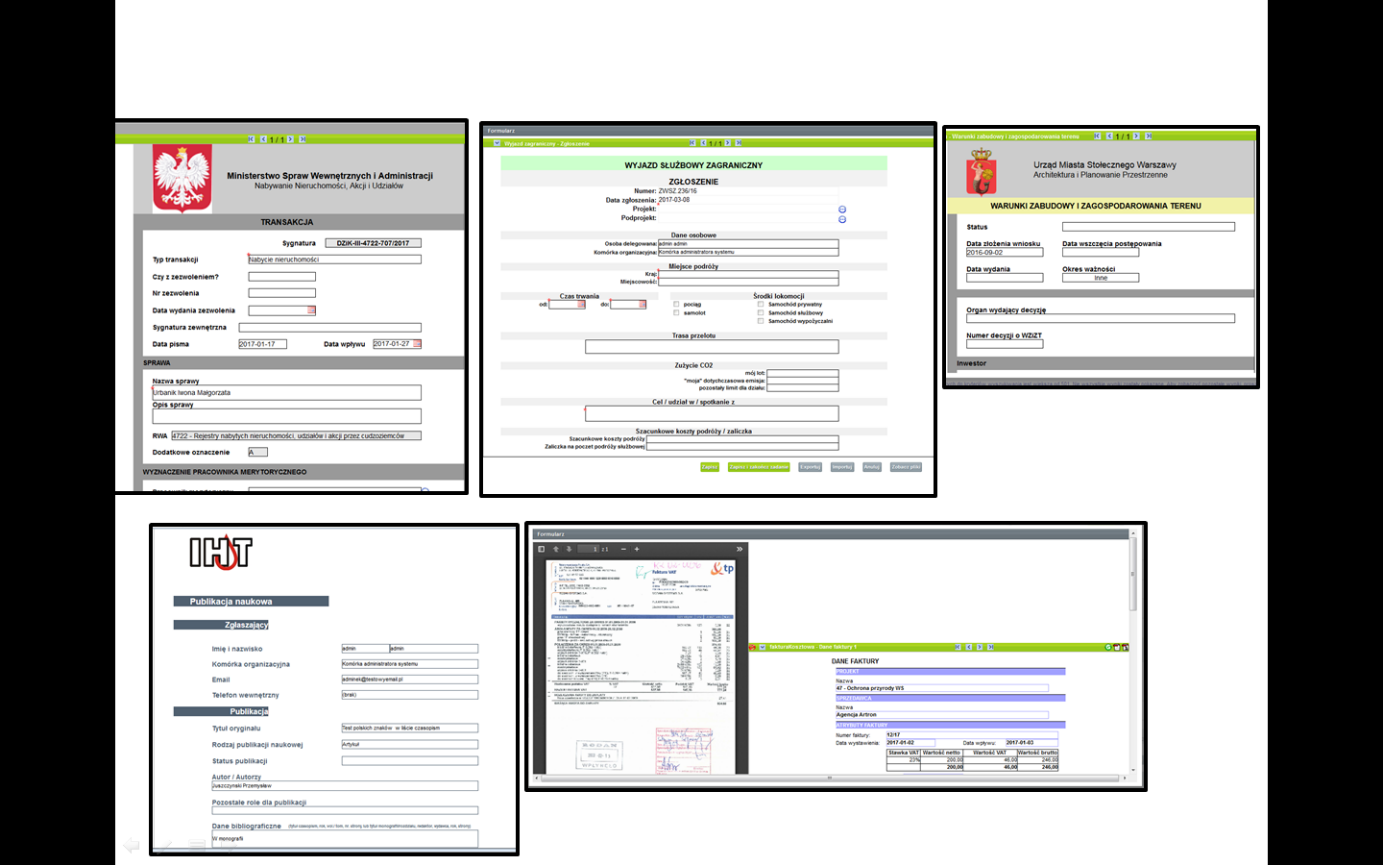
Figure 2. Gallery of sample GUIs based on docuRob ® eForms
One of the graphical user interface design schemes involves dividing the monitor screen into two parts, which allows for simultaneous display of a window containing the described document and a form window containing its data. Such an interface is usually used in systems requiring manual annotation of mass-scanned documents. By using the OCR function, it is also possible to automatically transfer elements of the text document content to the form fields.
At the bottom of one of the views you can see the function buttons that allow you to run the standard functions of the docuRob ® software*.* or to invoke software functions implemented within the application.
Form Data Model
docuRob®eForms form data model in the UML Class Diagram notation is shown in Figure 3. The colors highlight the form elements that constitute its view in the web browser (GUI) and the specification elements created or used while defining the structure of the form type.
An instance of an electronic form is created and stored as an XML file, whereby the creation of its definition in the form designer tool can be supported by an XSD schema received from the from an external IT system. For example, The form schema may be created in accordance with a taxonomy based on the definition of a subset of attributes selected from the central Data Dictionary. In accordance with the adopted methodology for implementing docuRob**®** applications such a data dictionary should be maintained centrally for the entire organization.
The form view is a structure divided into sheets comprising selected form fields and managed by presentation rules. This feature is key for selective presentation of the electronic form areas required within a specific business process task.
A form field can be simple , that is, it can contain one value of the taxonomy attribute associated with it. The value type is one of the attribute definition parameters and includes formats such as a string , a time expressed in hours and minutes, a date according to the adopted definition, and a number integer or real .

Figure 3. Form data model (class diagram)
An important role, especially in applications, is played by dictionary fields that allow the selection of a field value from a list that enumerates the domain terminology, or from a dynamic list created as a result of a query to the system ontology or an external data source*.* An example of the latter may be a list of users obtained from the LDAP directory or from the docuRob®Ontology module**.**
To create dynamic lists constituting external dictionaries, the TMSL (Topic Maps Scripting Language) language is used if the source of values is an ontology, or languages such as SQL or XPath if the data source is a relational database or an XML file, respectively.
Logical fields that typically control the execution of a business process include types such as drop down menus, single or multiple selection fields.
The form view can be extended by adding fields containing an image materialized dynamically based on the URI address or statically using a file containing graphics placed in the form data structure. The form content can also be extended based on the associated binary files.
A complex form field is any repeating collection of simple fields presented as a table or as a group of fields.
Selected form field values are saved in relational database tables according to the types of their associated attributes and the mapping rules defined in docuRob®eForms.
Saving a form file in XML format can be done either in the mode of the associated XSD schema definition or in accordance with the mapping rules specified in the docuRob®eForms product**.** The graphical form of the form presentation in the web browser is controlled by the associated CSS file generated based on the selected graphic options by the docuRob®eForms form designer tool .